

Switching a digital crane scale from kilograms to pounds seems like a simple setting change, yet the accuracy of the scale can shift once the measurement unit is altered. Many industrial lifting operations rely on highly precise readings to ensure safe load handling, quality control, and compliance with workplace standards. Therefore, understanding how calibration works—and why it matters—is essential, especially when using professional lifting tools such as the KAWASAKI Crane Scale OCS and OSC offered by Apollo Hoist.
Apollo’s KAWASAKI crane scales are widely adopted across warehouses, manufacturing facilities, logistics centers, and construction sites due to their stable structure, overload protection, reliable load sensors, and convenient unit-switch capabilities. Once the measurement unit is changed, proper calibration ensures that every reading remains accurate and trustworthy during real-world operations.
Why Does a Crane Scale Need Calibration after Switching Units?
When a crane scale shifts between kg and lbs, the internal calculation format changes as well. Even though modern load cells can automatically translate weight values, slight deviations may occur without recalibration. This makes calibration essential for maintaining repeatable accuracy in demanding industrial environments.
Calibration Basics and Unit Conversion
A digital crane scale derives its weight reading from an electrical signal produced by the load cell. When the measurement unit changes, the internal conversion ratio also changes. Even a minor mismatch between the expected ratio and the sensor output may lead to noticeable errors. This is why a quick recalibration step helps the scale align its digital interpretation with the actual load applied.
Internal Sensor Response Differences
Load cells react differently depending on environmental temperature, humidity, battery levels, and long-term usage. Once the unit changes, the scale’s microprocessor recalculates each reading in a new format. This transition can lead to small inconsistencies, especially if the scale has been in service for a long period. Recalibration corrects these offsets so the scale can respond consistently in its new unit.
Accuracy Requirements in Industrial Lifting
Industrial operations typically require consistent readings within very tight tolerance levels. A small deviation may seem insignificant, but in crane lifting applications, even minor inaccuracies can increase safety risks or affect inventory records. Knowing this, Apollo’s KAWASAKI crane scales are designed with built-in accuracy protection features such as overload warnings, resolution switching, and stable load structures to support reliable calibration.
How to Start the Calibration Process on a Digital Crane Scale?
Before calibrating either the OCS or OSC model, several standard steps help prepare the device for accurate recalibration. These steps apply to most digital crane scales and can prevent errors later in the process.
Power-On Check and Zeroing
Calibration should always start with a clean reference point. After powering on the crane scale, allow it to stabilize and ensure the display returns to zero. Any residual number on the screen may distort the calibration result. Many Apollo scales feature quick Zero/Tare buttons, making this step simple and intuitive.
Entering the Calibration Menu
Most digital crane scales include a password-protected calibration mode. This prevents accidental adjustments by unauthorized users. Access often requires pressing a sequence of buttons while the scale is powered on. Once inside the calibration menu, the operator can adjust unit settings, resolution, test weight value, and calibration checkpoints.
Preparing Certified Test Weights
Using a certified test weight in the same unit selected for calibration helps ensure accuracy. Since the goal is calibrating for lbs, a verified pound-based test weight is recommended. The precision level of the test weight should match the industrial accuracy requirement of the job site. Apollo’s KAWASAKI scales support high-resolution measurements, making them compatible with strict calibration procedures.
How to Calibrate the KAWASAKI Crane Scale OCS When Switching Units?
Apollo’s KAWASAKI OCS crane scale is widely selected for its integrated load structure, large LCD display, waterproof panel, auto power-off function, unit switch, and resolution switch.
These functions make unit-based calibration simple and efficient.
Step-by-Step Calibration Workflow
The basic sequence for recalibrating the OCS after changing to lbs typically includes:
- Power on the scale and confirm the display reads zero.
- Enter the calibration menu using the designated key combination.
- Switch the measurement unit to lbs.
- Set the calibration value according to the certified test weight.
- Hang the test weight carefully.
- Allow the reading to stabilize, then confirm the calibration setting.
- Save the data and exit the menu.
Once complete, the OCS should display consistent and accurate weight readings in lbs.
Resolution and Unit Switch Settings
The OCS offers both unit switch and resolution switch features, allowing operators to adjust how fine or coarse the digital reading appears. This is particularly useful when different regional markets require different measurement systems or accuracy levels. Adjusting the resolution ensures that the display remains stable even with small load variations.
Overload Warning and Accuracy Verification
After completing the calibration, applying several loads of different weights helps verify accuracy. The built-in overload warning system protects the scale from excessive loads, while the auto power-off function prevents errors caused by battery fatigue. These features collectively strengthen calibration reliability under daily industrial use.
How to Calibrate the KAWASAKI Crane Scale OSC During Unit Conversion?
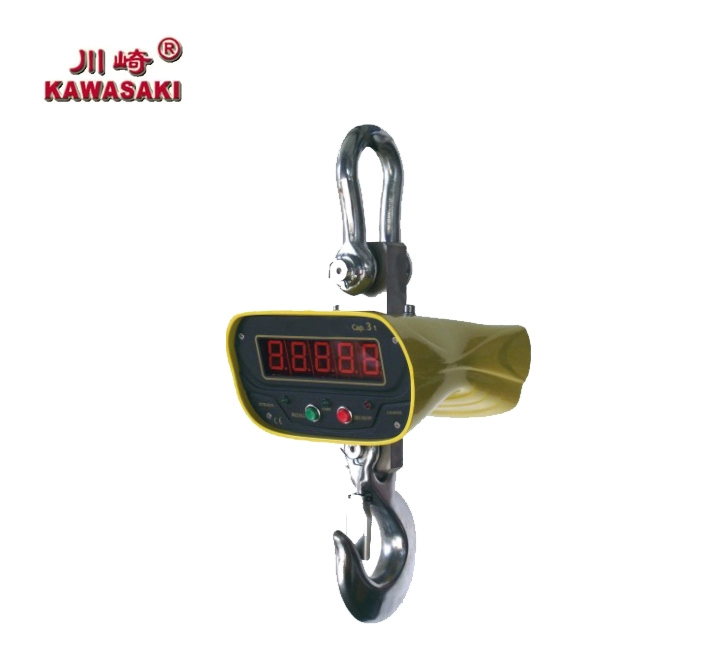
Apollo’s KAWASAKI OSC shares many functional similarities with the OCS but offers additional flexibility with optional handheld indicators and extended display functions. These upgrades make it convenient for operators who need to monitor readings at a distance or in complex lifting environments.
Initial Setup and Zero/Tare
Before entering calibration mode, the OSC should be completely unloaded. After powering on, the operator can use the Zero/Tare button to eliminate any residual digital readings. This ensures a clean baseline for recalibration in lbs.
Applying Test Loads in lbs
Once the scale is set to lbs, the chosen test weight should be applied smoothly. Allow the digital display to stabilize before confirming the calibration value. If the reading fluctuates too much, repeating the process or using a slightly heavier test weight may improve accuracy.
Using Display Hold and Voltage Display for Stability Check
The OSC includes a Display Hold feature that locks the reading on the screen, making it easier to confirm that the calibration measurement is stable. Meanwhile, the Voltage Display function helps operators ensure that low battery levels do not interfere with the calibration process or cause data drift during lifting operations.
What Problems May Occur after Unit Switching and How to Fix Them?
Switching measurement units can sometimes cause temporary display or accuracy changes. Fortunately, most issues can be resolved quickly using simple adjustments.
Display Fluctuation or Slow Response
This may happen in environments with strong vibration or wind, or when the load is not stable. Using the Hold feature or adjusting the resolution level can help stabilize readings, especially with Apollo’s integrated load structure scales.
Incorrect Weight Reading after Calibration
If the reading still shows deviations, the calibration process may need to be repeated using a heavier or more precise test weight. Double-checking that the correct unit (lbs) is selected also resolves many inconsistencies.
Battery-Related Accuracy Issues
Digital crane scales rely heavily on stable voltage. Models like the OCS and OSC include a voltage display to help operators identify when the batteries are running low. Replacing the batteries before calibration ensures accurate measurement and reduces display drift.
Why Choose Apollo’s KAWASAKI Crane Scales for Unit-Sensitive Applications?
Apollo’s lifting equipment portfolio combines decades of Taiwanese and Japanese R&D experience with a global customer base. The KAWASAKI OCS and OSC crane scales are designed to deliver reliable performance in demanding lifting environments where measurement precision is critical.
Stable Measurement Structure and Safety Features
Both models feature integrated load structures, large LCD screens, overload warnings, and waterproof panels. These features ensure stability, accuracy, and safety across a wide range of industries.
Flexible Unit Switching and Resolution Control
With built-in unit switching, resolution adjustment, and display hold functions, these crane scales seamlessly adapt to international trade, multi-country operations, and mixed unit systems without compromising accuracy.
OEM/ODM Options and Professional After-Sales
Apollo supports customized branding, packaging, function adjustments, and appearance modifications. The company also provides accessories services, one-year warranty, and video operation guidance, ensuring long-term reliability and support for global clients.
FAQ
Q1: Do crane scales lose accuracy after switching from kg to lbs?
A: A slight deviation may occur due to internal conversion differences, which is why recalibration is recommended after changing units.
Q2: How often should a digital crane scale be calibrated?
A: The frequency depends on usage, environmental conditions, and load intensity. Many industrial facilities calibrate monthly or quarterly.
Q3: Can Apollo’s KAWASAKI crane scales be customized for specific industries?
A: Yes. Apollo offers OEM/ODM customization for functions, color, packaging, and performance requirements, making the scales suitable for various industrial environments.